Project schedule model (audit step template)
You can assign a model of the Project schedule type to the audit template (Task (project) to define the audit steps of an audit.
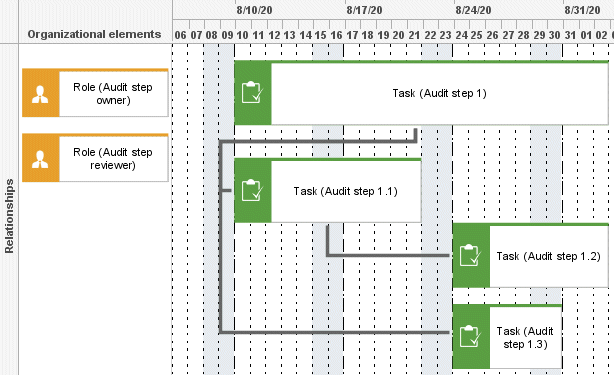
Preparation of the project schedule model for Audit Management
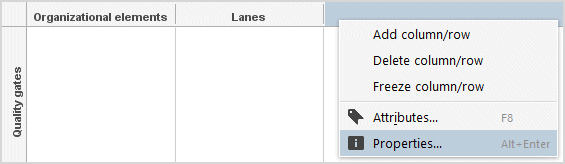
The row/column properties must be specified for attribute-based modeling. Right-click the column header, select Properties > Format > Attribute-based modeling.
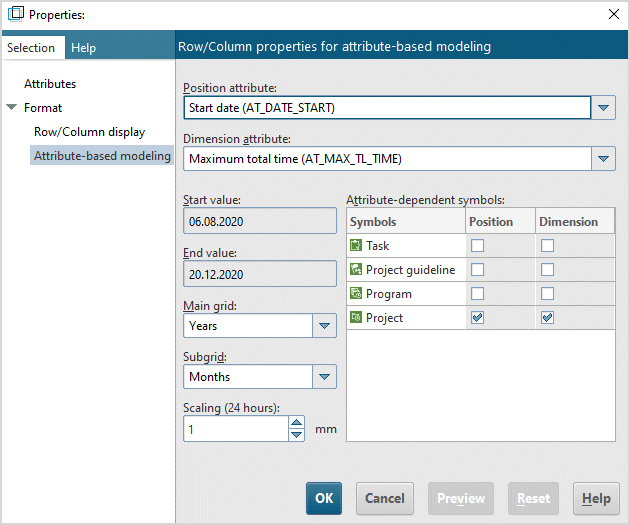
Edit the attributes Start date (Position attribute) and the Max. total time (Dimension attribute).
Attribute-dependent symbols: Both, position and dimension, must be allowed for the Task object. Audit step templates are modeled with the Task object into the Relationships rows. The Quality gates row is not necessary for an audit project template.
Objects that can be used in the Project schedule model
Object type name | ARCM name |
|---|---|
Task | Audit step template |
Audit step owner |
Connections (audit steps)
Object | Connection | Object | Remark |
|---|---|---|---|
Task (task) | is carried out by | The implicit connection to the task is generated automatically if you model the organizational unit in the first column (organizational elements). | |
Task (task) | belongs to | Task (task) | Defines which task is superior. |