Data request URL structure
The communication between a dashboard and ARIS Risk and Compliance takes place via an HTTP query interface. Parameters are sent to ARIS Risk and Compliance via an HTTP address, interpreted there, and transformed into a database query. The data request URL has the following format:
<Server>/<Context>/api/query?qname=<Name of table>&qlanguage=<Language>&qsort=<Attribute name>,<Sort direction>&qmax<Number>&qattr=<Attribute name>,<Comparator>~<Attribute value>
https://arcmserver/arcm/api/query?qname=risk2risktype&qlanguage=en&qsort=R_CLIENT,DESC&qmax=20&qattr=R_TYPE,EQ~2
The part in front of the question mark can be understood as an address, where the parameter :<Port> can be omitted if the server runs under the HTTP standard port (Port 80). The actual query starts after the question mark. The data in angle brackets are placeholders for your entry. Query parameters are separated by the ampersand (&) character. The data request URL consists of the following components:
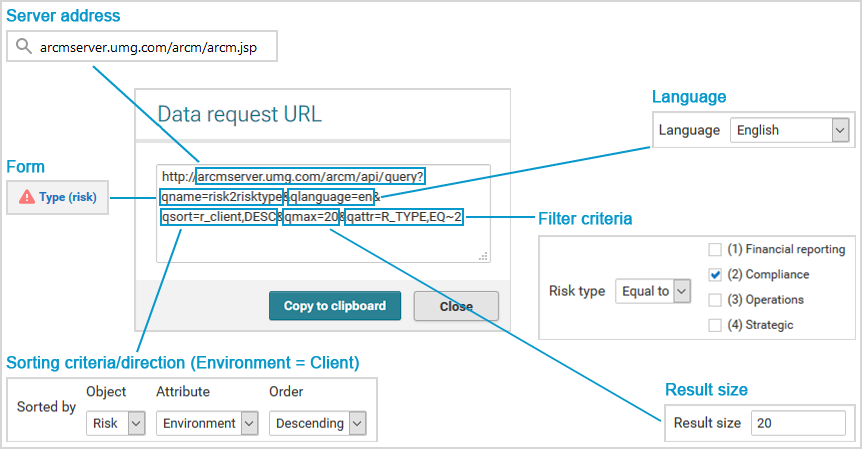
1. Server address
The server address comes first. Its composition depends on the installation and configuration of ARIS Risk and Compliance.
Format: <Server>:<Port>/<Context>/api/query?
https://arcmserver/arcm/api/query?
2. Name of the query list
The name of the list to be used for generating the data request URL follows. The predefined lists that can be queried using the interface are stored in the configuration of ARIS Risk and Compliance.
Format: qname=<Name of list>
qname=risk2risktype
3. Language of the language-specific attributes
Now the language is displayed in which the language-specific contents will be output in the dashboard. For example, error messages are output in the language specified. This does not apply if the data request URL is used with an ARIS table data source. In this case, the ARIS login language is used.
Format: qlanguage=<language>
qlanguage=en
4. Description of the selected sorting criteria
Displays the selected sorting criteria and the sort direction (ascending = ASC, descending = DESC).
Format: qsort=<Attribute name>,<Sort direction>
qsort=R_CLIENT,DESC
5. Result size (optional)
Specifies the maximum number of results to be output.
Format: qmax=<Number>
qmax=20
6. Description of filter criteria selected (optional)
The filter criteria are next. You can supplement them with additional parameters by adding the relevant attributes as well as the comparator and attribute value in the predefined format.
Format: qattr=<attribute name>,<comparator>~<attribute value>
qattr=R_TYPE,EQ~2